
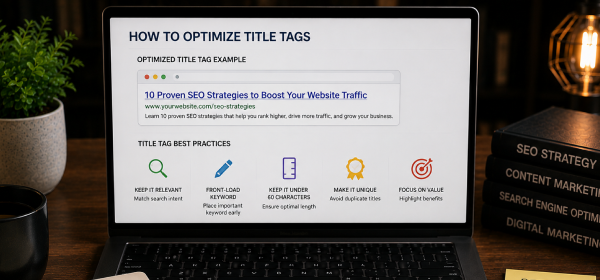
To optimize title tags, include your primary keyword naturally, keep the title between 50–60 characters, write compelling copy for users, add a power word when appropriate, avoid keyword stuffing, and ensure every page has a unique title that matches search intent.
A title tag is often the first thing users notice when your webpage appears in Google Search. It not only influences whether someone clicks on your page but also helps search engines understand what your content is about.
Even if your content is well-written, a poorly optimized title tag can reduce your click-through rate and limit your ranking potential. That's why learning How to Optimize Title Tags is an essential part of every successful SEO strategy.
An effective title tag balances SEO and user experience. It includes the target keyword naturally, communicates value, and encourages users to click without sounding misleading or repetitive.
In this guide, you'll learn what title tags are, why they matter, how to optimize them correctly, common mistakes to avoid, and proven best practices that align with Google's recommendations.
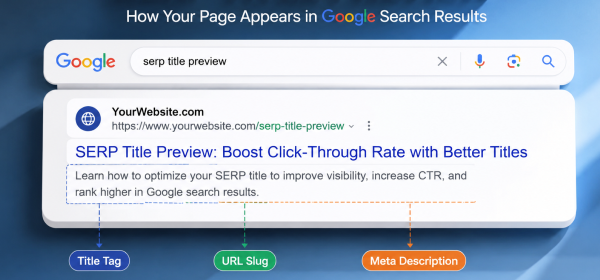
A title tag is an HTML element that specifies the title of a webpage. It appears as the clickable headline in search engine results and is also displayed in browser tabs and when pages are shared on social media.
A well-written title tag helps users understand what your page offers before they visit it. It also provides search engines with an important signal about the page's topic and relevance.
A title tag can appear in several places, including:
Because it is visible in multiple locations, writing a clear and descriptive title is essential for both SEO and user experience.
Search engines analyze title tags to determine the primary topic of a webpage. While Google considers many ranking factors, the title tag remains one of the strongest On-Page SEO signals.
A relevant and descriptive title helps search engines categorize your content correctly and display it for appropriate search queries.
Users often decide whether to click your page based on its title. A compelling title that clearly communicates value is more likely to attract clicks than a generic or confusing one.
Higher click-through rates can increase organic traffic and improve the overall performance of your content.
Clear title tags set accurate expectations before users visit your page. When the page content matches the promise made in the title, visitors are more likely to stay engaged.
Place your primary keyword naturally within the title tag. Whenever possible, position it near the beginning of the title because users and search engines notice the first words more quickly.
Example:
✅ How to Optimize Title Tags: Complete SEO Guide
Avoid forcing keywords unnaturally or repeating the same phrase multiple times.
Google typically displays around 50–60 characters of a title before truncating it. Longer titles may still be indexed but could be shortened in search results.
Aim for concise titles that communicate the page's purpose without unnecessary words.
Each page on your website should have its own unique title tag. Duplicate titles make it difficult for search engines to distinguish between pages and may confuse users.
Unique titles also improve your site's overall SEO structure and help each page target a specific topic.
Your title should accurately reflect what users expect to find on the page.
For example:
| Search Intent | Better Title Example |
|---|---|
| Informational | What Is Technical SEO? Complete Guide |
| Commercial | Best SEO Tools for Small Businesses |
| Transactional | Buy SEO Audit Services Online |
Matching search intent increases the likelihood that users will click and remain on your page.
While keywords are important, your title should always read naturally.
Instead of writing:
SEO Tips SEO Guide Best SEO Tips
Write:
15 Practical SEO Tips to Improve Your Website Rankings
Titles that sound natural tend to perform better because they appeal to real users rather than attempting to manipulate search engines.
Adding numbers or persuasive words can improve click-through rates.
Examples include:
However, only use these words when they accurately represent the content.
For important landing pages or well-known brands, adding the brand name at the end of the title can improve recognition.
Example:
How to Optimize Title Tags | YourBrand
This is particularly useful for businesses with established brand authority.
| Best Practice | Why It Matters |
|---|---|
| Include the primary keyword | Improves relevance |
| Keep titles under 60 characters | Prevents truncation |
| Write unique titles | Avoids duplicate signals |
| Match search intent | Improves CTR and engagement |
| Use natural language | Enhances readability |
| Add power words carefully | Encourages clicks |
| Avoid keyword stuffing | Improves user experience |
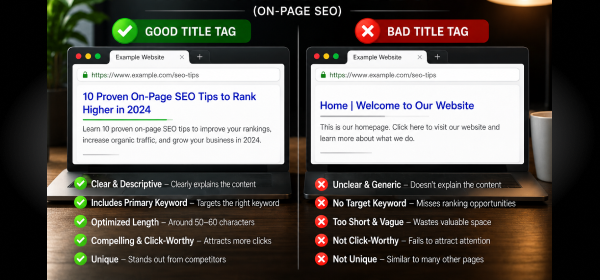
| Good Title | Bad Title |
|---|---|
| How to Optimize Title Tags: Complete Guide | SEO Title SEO Title SEO |
| 15 SEO Tips for Beginners | SEO Tips SEO Tips SEO |
| Best Local SEO Strategies for Small Businesses | Local SEO Local SEO Local SEO |
These examples show how clarity and relevance outperform repetitive keyword usage.
Search your target keyword and compare your title with the top-ranking pages. Look for opportunities to make your title clearer, more specific, or more compelling.
Use Google Search Console to monitor the CTR of your pages. If a page ranks well but has a low CTR, improving the title tag may increase traffic.
SEO is an ongoing process. Review older pages periodically and update title tags if they no longer reflect current search intent or best practices.
Repeating the same keyword multiple times makes titles look spammy and reduces readability.
Very long titles may be truncated in search results, hiding important information from users.
Duplicate title tags make it harder for search engines to understand which page is most relevant.
A title that doesn't match user expectations often results in lower click-through rates and weaker engagement.
Misleading titles may attract clicks initially, but they often increase bounce rates because the content doesn't meet user expectations.
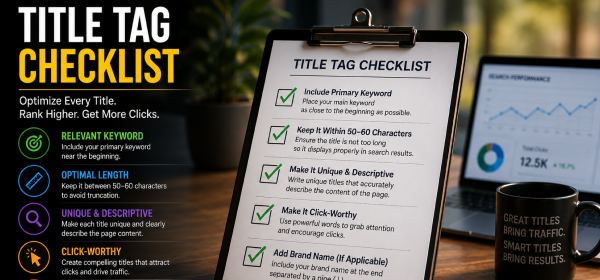
| Checklist Item | Status |
|---|---|
| Primary keyword included | ✅ |
| Keyword placed naturally | ✅ |
| Title under 60 characters | ✅ |
| Unique title written | ✅ |
| Search intent matched | ✅ |
| No keyword stuffing | ✅ |
| Power word included | ✅ |
| Compelling for users | ✅ |
A title tag is an HTML element that defines the title of a webpage. It appears in search engine results, browser tabs, and social media previews, helping users and search engines understand the page's content.
The recommended length is approximately 50–60 characters to reduce the chance of truncation in search results while still communicating the page's value.
Yes. Every webpage should have a unique title tag to help search engines distinguish between pages and improve overall SEO performance.
Yes. Title tags are an important On-Page SEO element because they help search engines understand page relevance and influence click-through rates from search results.
Yes. Google may rewrite title tags if it believes another title better represents the content or improves the search experience. Writing clear, relevant, and descriptive titles reduces the likelihood of rewrites.
Learning How to Optimize Title Tags is one of the simplest yet most effective ways to improve your On-Page SEO. A well-crafted title tag helps search engines understand your content, encourages users to click your page, and supports higher organic visibility.
Focus on writing concise, unique, and descriptive titles that naturally include your primary keyword and align with search intent. Avoid keyword stuffing, keep titles within the recommended length, and regularly review their performance using Google Search Console.
When combined with high-quality content and a strong overall SEO strategy, optimized title tags can significantly improve both your rankings and click-through rates.




Finally a gaming site that does not feel cluttered or pushy with ads. The registration took less than a minute and I started playing right away. Real players should definitely check out what they offer this month gamef66