

URL Structure Best Practices involve creating short, descriptive, readable URLs that clearly communicate the page topic. Use relevant words, lowercase characters, hyphens between words, and a logical website hierarchy. Avoid unnecessary parameters, excessive folders, keyword stuffing, and confusing URL structures.
Your URL is one of the first things users and search engines encounter when they access a webpage. A confusing URL filled with random numbers, unnecessary parameters, or meaningless characters can make a page harder to understand and share. That's why following URL Structure Best Practices is an important part of technical and On-Page SEO.
A well-structured URL gives users an immediate idea of what a page is about. It can also help search engines understand the relationship between pages and the broader structure of your website. Although URL structure alone does not guarantee higher rankings, clean and logical URLs contribute to better crawling, usability, and overall website organization.
For example, a URL such as /seo/url-structure-best-practices/ clearly communicates the topic. In contrast, /page?id=58392 provides almost no useful context.
The good news is that creating SEO-friendly URLs does not require complicated technical knowledge. By applying a few consistent rules, you can make your URLs cleaner, easier to understand, and more search-friendly.
This guide explains URL Structure Best Practices, including URL length, keywords, hyphens, folders, parameters, redirects, canonical URLs, and common mistakes to avoid.
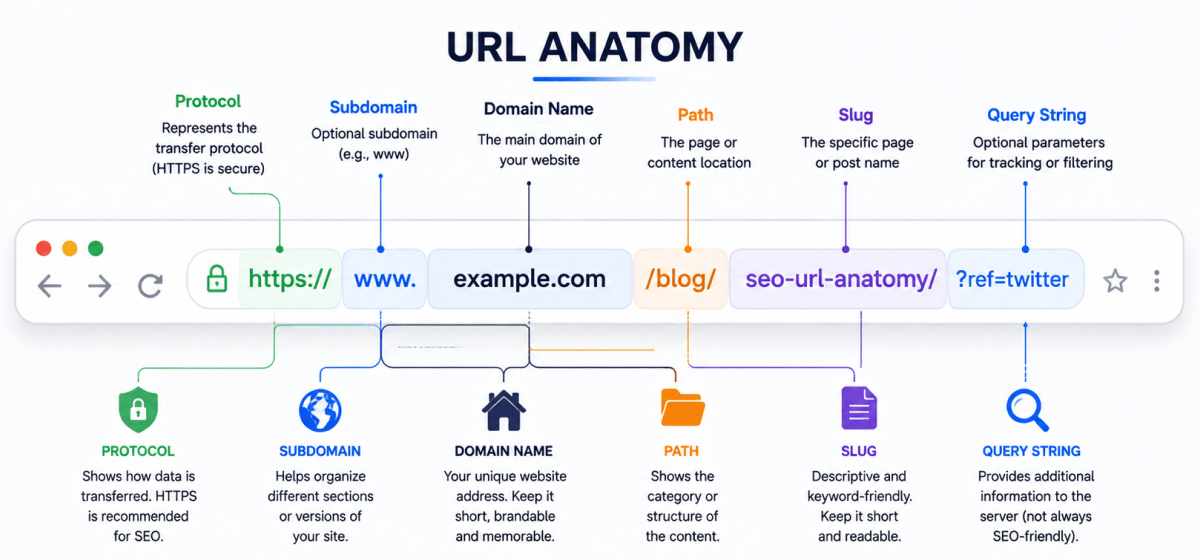
URL structure refers to the way a webpage's web address is organized. A URL can contain several components, including the protocol, domain name, path, folders, slug, query parameters, and sometimes fragments.
For example:
Here, https:// is the protocol, example.com is the domain, seo represents a directory, and url-structure-best-practices is the page slug.
A logical structure makes URLs easier for users to understand and helps search engines interpret how pages fit within a website.
| URL Component | Example | Purpose |
|---|---|---|
| Protocol | https:// | Provides secure communication |
| Domain | example.com | Identifies the website |
| Subdirectory | /seo/ | Organizes related content |
| Slug | /url-structure-best-practices/ | Describes the specific page |
| Query Parameter | ?sort=price | Provides additional instructions or filters |
| Fragment | #examples | Points to a specific section |
Not every URL contains every component. For most SEO-focused pages, the protocol, domain, and descriptive path are the most important elements to consider.
A clean URL structure benefits both search engines and website visitors. While URLs are only one part of SEO, they contribute to a website's overall usability and organization.
Descriptive URLs provide additional context about a webpage. A URL containing meaningful words can help search engines understand what the page is about.
For example:
example.com/seo/keyword-research/
is more descriptive than:
example.com/page123?id=87
The first URL communicates the subject immediately, making it easier for users and search engines to interpret.
Users often look at a URL before clicking a search result or sharing a page. A readable URL gives them confidence that the destination is relevant.
For example:
example.com/blog/technical-seo-guide/
is easier to understand than:
example.com/blog/article.php?id=8293
Clear URLs can therefore make your website feel more trustworthy and organized.
A consistent URL structure creates a logical relationship between related pages.
For example:
example.com/seo/
example.com/seo/keyword-research/
example.com/seo/on-page-seo/
example.com/seo/technical-seo/
This structure makes it easier to organize content around a central topic and can support a broader topic-cluster strategy.
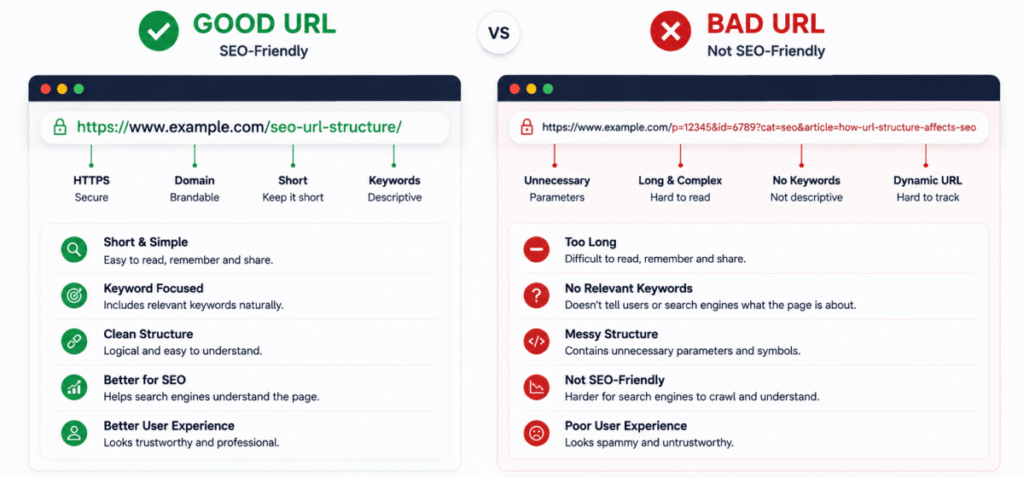
Following a consistent set of rules is the easiest way to create SEO-friendly URLs across your website.
One of the most important URL Structure Best Practices is keeping URLs concise while still explaining the page topic.
A shorter URL is generally easier to read, remember, copy, and share. However, you should not remove important words simply to make the URL as short as possible.
Better:
example.com/seo/url-structure/
Less useful:
example.com/blog/2026/08/10/seo-guide/url-structure-best-practices-for-beginners-and-businesses/
The second URL contains unnecessary information that does not help users understand the page.
Including a relevant keyword in the URL can help users and search engines understand the subject of the page.
For a page targeting URL Structure Best Practices, a suitable URL might be:
example.com/url-structure-best-practices/
The keyword should describe the actual page topic. Avoid adding unrelated keywords simply to increase keyword coverage.
Use hyphens to separate individual words in URLs.
Recommended:
/url-structure-best-practices/
Avoid:
/url_structure_best_practices/
Hyphens make URLs easier to read and are the standard separator for words in search-friendly URLs.
Keep URLs lowercase whenever possible.
Recommended:
example.com/seo-guide/
Avoid:
example.com/SEO-Guide/
Some servers can treat uppercase and lowercase URLs as different addresses. Consistent lowercase URLs reduce the possibility of duplicate URLs and technical confusion.
URLs do not need to contain every word from the page title.
For example, if your page title is:
15 Powerful URL Structure Best Practices for Better SEO Rankings
the URL can simply be:
/url-structure-best-practices/
Words such as "15," "powerful," and "better" are not necessary for the URL to communicate the topic.
Creating a clean URL becomes easier when you follow a repeatable process.
Identify the primary subject of the page before creating the URL.
For example, if your article discusses optimizing title tags, the URL could be:
/optimize-title-tags/
The URL immediately communicates the purpose of the page.
Remove filler words when they do not add meaningful context.
Words such as "the," "a," "and," or "for" can sometimes be removed when doing so makes the URL cleaner.
However, readability should always come first. Do not remove words if doing so makes the URL confusing.
The slug should summarize the page in a few meaningful words.
For example:
/seo/url-structure-best-practices/
is descriptive, concise, and easy to understand.
The URL, title, heading, and page content should communicate the same topic.
If the URL says /keyword-research/ but the page is actually about technical SEO, the structure creates confusion for both users and search engines.
Examples make URL Structure Best Practices easier to understand and apply.
| Page Topic | SEO-Friendly URL | Poor URL |
| Keyword Research | /keyword-research/ | /page?id=123 |
| On-Page SEO | /on-page-seo/ | /article_8492/ |
| SEO Checklist | /seo-checklist/ | /blog/post12345/ |
| Image SEO | /image-seo/ | /images/?p=7382 |
| Internal Linking | /internal-linking/ | /page.php?id=492 |
The goal is not to make every URL identical. The goal is to make each URL meaningful, predictable, and relevant to its corresponding page.
There is no universal character limit that guarantees an SEO-friendly URL. However, shorter URLs are generally easier for users to understand and share.
Instead of obsessing over an exact character count, focus on removing unnecessary information while preserving the page's meaning.
Consider these two examples:
Better:
/seo/keyword-research/
Too long:
/blog/seo-guide/complete-step-by-step-keyword-research-guide-for-beginners-and-marketers/
The longer version contains unnecessary words and makes the URL harder to scan.
A practical rule is to use the fewest words necessary to clearly describe the page.
Keywords can be useful in URLs when they accurately describe the page. However, adding keywords repeatedly can make URLs look unnatural.
For most pages, one primary topic is enough.
For example:
/keyword-research/
is better than:
/keyword-research-keywords-seo-keyword-research-guide/
The second version is repetitive and provides no meaningful additional information.
URLs should be written for people first.
A URL such as:
/best-seo-tools-best-seo-tools-seo-tools/
looks manipulative and does not improve usability.
Instead, use:
/best-seo-tools/
The shorter version clearly communicates the topic without unnecessary repetition.
Choosing the right characters is another important part of URL Structure Best Practices.
Use hyphens to separate words.
| Character | Example | Recommendation |
| Hyphen | /seo-best-practices/ | ✅ Recommended |
| Underscore | /seo_best_practices/ | ⚠️ Avoid |
| Space | /seo best practices/ | ❌ Invalid/unsafe |
| Multiple symbols | /seo---best!!!/ | ❌ Avoid |
Hyphens create cleaner, more readable URLs and should be your default choice for separating words.
Characters such as &, %, @, and excessive punctuation can make URLs harder to read and share.
Simple URLs containing relevant words are generally easier to manage.
| Optimization Task | Status |
| Use a descriptive URL | ✅ |
| Keep URLs concise | ✅ |
| Include the primary topic naturally | ✅ |
| Use lowercase letters | ✅ |
| Separate words with hyphens | ✅ |
| Avoid unnecessary parameters | ✅ |
| Avoid keyword stuffing | ✅ |
| Maintain a logical hierarchy | ✅ |
| Avoid excessive folders | ✅ |
| Keep URLs consistent | ✅ |
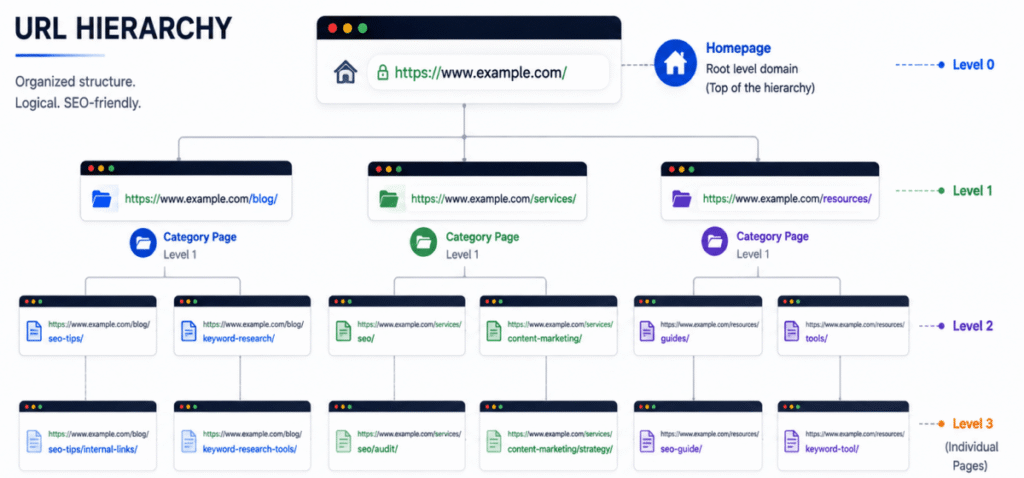
A logical URL hierarchy helps organize related content and makes your website easier to navigate. Your URLs should reflect the way important topics and subtopics are organized across the site.
For example:
example.com/seo/
example.com/seo/keyword-research/
example.com/seo/on-page-seo/
example.com/seo/technical-seo/
This structure creates a clear relationship between the main SEO topic and its supporting pages.
Use folders when they genuinely help organize content.
For example:
/seo/keyword-research/
is useful when keyword research is a section of your broader SEO content.
However, avoid creating unnecessary levels such as:
/blog/seo/guides/beginners/2026/keyword-research/
A deep hierarchy can make URLs unnecessarily long and difficult to manage.
Adding more folders does not automatically improve rankings.
If your website structure does not require categories, a simple URL can be better:
example.com/keyword-research/
Rather than:
example.com/blog/seo/guides/keyword-research/
Choose the structure that best represents your website's organization.
There is no single URL structure that works for every website. Some websites benefit from categories, while others are better served by shorter URLs.
Categories can be useful for large websites with many related pages.
For example:
example.com/seo/keyword-research/
example.com/seo/on-page-seo/
This structure can make the site's organization clearer.
Categories can become problematic when content is moved between categories.
For example, changing:
/seo/keyword-research/
to:
/digital-marketing/keyword-research/
creates a new URL and may require redirects.
If your CMS frequently changes category structures, a shorter URL architecture can make long-term management easier.
Dynamic URLs often contain parameters generated by databases or filtering systems.
For example:
example.com/products?category=shoes&color=black
A static-looking URL might be:
example.com/shoes/black/
Dynamic URLs are not automatically bad for SEO. Search engines can crawl many parameter-based URLs, but unnecessary parameters can create duplicate or inefficient URLs.
Parameters can be useful for:
The key is to make sure parameters do not generate large numbers of unnecessary duplicate URLs.
If your website uses URL parameters, make sure search engines can identify the preferred version of a page.
For example:
example.com/shoes/
example.com/shoes?color=black
example.com/shoes?sort=price
These URLs may serve different purposes, but you should carefully manage which versions should be indexed.
A canonical URL tells search engines which version of a page should be treated as the preferred URL when multiple URLs contain substantially similar content.
Canonicalization is especially useful for websites with filtering, sorting, tracking, or duplicate URL variations.
Choose a consistent trailing-slash convention for your website.
For example, decide whether your preferred format is:
example.com/seo/
or:
example.com/seo
Either approach can work. The important thing is consistency and proper redirects or canonical signals when multiple versions resolve separately.
Using HTTPS is an essential part of a modern website.
A secure URL looks like:
rather than:
http://example.com/seo-guide/
HTTPS protects data exchanged between the visitor and website and is a standard expectation for modern websites.
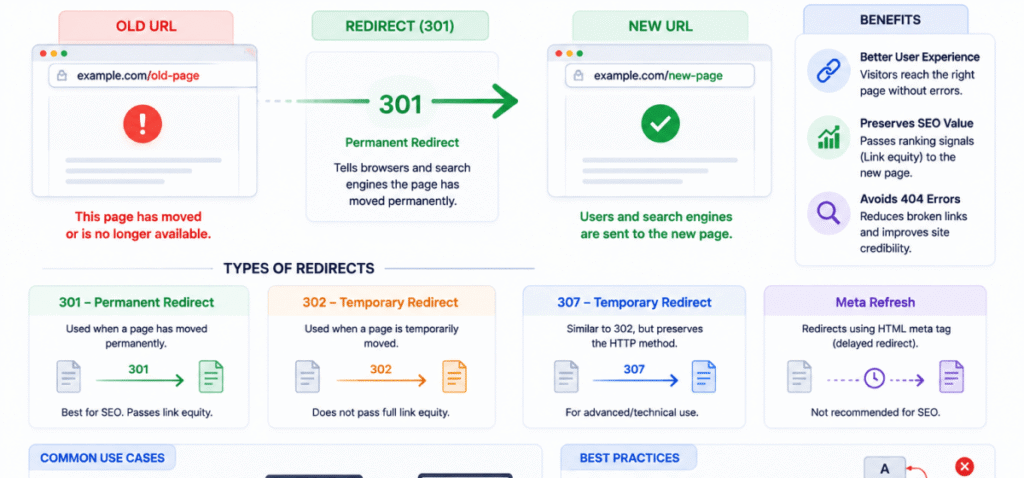
Sometimes changing a URL is necessary. However, changing URLs without proper redirects can cause broken links and lost traffic.
If an existing page permanently moves from one URL to another, use an appropriate permanent redirect.
For example:
Old:
/old-seo-guide/
New:
/seo-guide/
A properly implemented redirect helps users and search engines reach the new location.
A URL should not be changed simply because you found a slightly shorter alternative.
If an existing URL is already performing well, receives backlinks, and is indexed correctly, changing it may create unnecessary technical work.
One of the most practical URL Structure Best Practices is to establish a consistent structure early and maintain it.
Different websites may need different URL architectures.
| Website Type | Recommended Example |
|---|---|
| Blog | /seo/keyword-research/ |
| eCommerce | /shoes/running-shoes/ |
| Service Business | /services/seo/ |
| Local Business | /locations/jaipur/ |
| News Website | /technology/seo-trends/ |
| SaaS Website | /features/seo-tools/ |
The best structure depends on how your content, products, services, and users are organized.
URLs such as:
/page/483920/
provide little information about the page.
Use descriptive slugs whenever possible.
Mixed-case URLs can create inconsistencies and potentially lead to multiple URL versions.
Keep URLs lowercase for a cleaner and more predictable structure.
A blog URL such as:
/2026/08/10/url-structure-best-practices/
may become outdated even when the content remains useful.
For evergreen content, a simpler structure can be more practical:
/url-structure-best-practices/
Avoid unnecessarily deep URLs.
Too deep:
/blog/seo/guides/beginners/on-page/technical/url-structure/
Better:
/seo/url-structure/
Keep the structure as simple as your website's information architecture allows.
Frequent URL changes can create redirects, broken links, indexing complications, and maintenance problems.
Choose a logical structure and keep it stable.
Avoid URLs that only make sense internally.
For example:
/svc/seo-opt/
is less clear than:
/services/seo/
Use words that your visitors can understand.
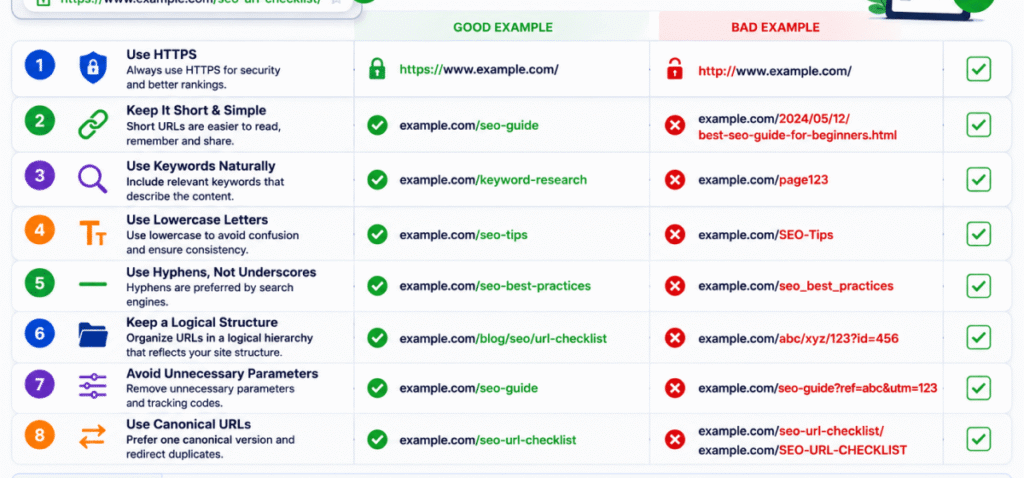
Use this checklist before publishing a new page:
| Check | Question | Status |
|---|---|---|
| Relevance | Does the URL describe the page? | ✅ |
| Length | Is unnecessary information removed? | ✅ |
| Keyword | Is the main topic represented naturally? | ✅ |
| Case | Is the URL lowercase? | ✅ |
| Separators | Are hyphens used between words? | ✅ |
| Readability | Can a user understand it immediately? | ✅ |
| Hierarchy | Does it fit your website structure? | ✅ |
| Parameters | Are unnecessary parameters avoided? | ✅ |
| Consistency | Does it follow your site's URL convention? | ✅ |
| Stability | Is there a good reason to change an existing URL? | ✅ |
Put the most meaningful terms toward the beginning of the slug.
For example:
/seo/url-structure/
is immediately understandable.
Do not create URLs such as:
/seo/seo-url-structure-seo-best-practices/
One clear reference to the main topic is enough.
Your URL should reflect what users expect to find.
For an informational guide:
/what-is-keyword-research/
For a service:
/seo-services/
For a checklist:
/on-page-seo-checklist/
This creates consistency between search intent and page purpose.
URL optimization should be part of your regular technical SEO audit.
Look for:
URL Structure Best Practices include keeping URLs short, descriptive, readable, lowercase, and relevant to the page topic. Use hyphens between words, avoid unnecessary parameters, and maintain a consistent hierarchy throughout the website.
Google uses many signals to understand and rank webpages. URLs provide useful information about a page's content and structure, but creating an optimized URL by itself does not guarantee higher rankings.
There is no universal character limit that guarantees better rankings. Keep the URL as short as practical while retaining enough information to clearly communicate the page topic.
Relevant keywords can be included when they naturally describe the page. Avoid keyword stuffing or repeating the same terms because it makes URLs harder to read.
Use hyphens to separate words in URLs. They create readable URLs and are the preferred choice for separating words.
Yes. Using lowercase URLs consistently helps prevent confusion between different URL versions and creates a cleaner website structure.
Not necessarily. If an existing URL is indexed, receives traffic, has backlinks, and works correctly, changing it may create unnecessary complications. Only change established URLs when there is a meaningful SEO, usability, or structural reason.
Folders can help communicate website organization, but simply adding more folders does not improve rankings. Use folders when they represent meaningful categories or sections of your website.
Following URL Structure Best Practices helps create a website that is easier for users to understand, easier for search engines to crawl, and easier for you to manage over time. A strong URL should communicate the page topic without unnecessary numbers, parameters, symbols, or excessive folder levels.
Keep your URLs short, descriptive, lowercase, and consistent. Use hyphens between words, include relevant keywords naturally, and create a logical hierarchy that reflects your website's content organization.
Remember that URL optimization is only one part of SEO. A clean URL cannot compensate for poor content, weak internal linking, technical problems, or a poor user experience. However, when combined with strong On-Page SEO and technical SEO practices, a well-planned URL structure creates a solid foundation for long-term organic search performance.





Hey I am so happy I found your website, I really found you by error,
while I was searching on Google for something else, Anyhow I am here now and would just like to say
thanks for a incredible post and a all round exciting blog
(I also love the theme/design), I don’t have
time to browse it all at the minute but I have bookmarked it and
also added your RSS feeds, so when I have time I will be back to read a lot more, Please
do keep up the great b.
What's Taking place i am new to this, I stumbled upon this
I've discovered It positively helpful and it has aided me out loads.
I am hoping to give a contribution & aid different customers like
its helped me. Good job.
Attractive section of content. I just stumbled upon your weblog and in accession capital to assert that I get
in fact enjoyed account your blog posts. Anyway I will be subscribing to your
augment and even I achievement you access consistently rapidly.