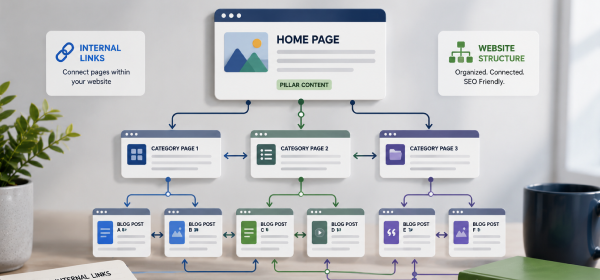
What Is Internal Linking? Internal linking is the practice of connecting one page of your website to another page on the same domain. It helps search engines discover and understand your content while guiding users to related information, improving navigation, and strengthening your website's overall SEO performance.
When people think about SEO, they often focus on keywords, backlinks, or content optimization. However, one of the most overlooked ranking factors is internal linking. A well-planned internal linking strategy helps search engines crawl your website more efficiently while making it easier for visitors to navigate between related pages.
Learning What Is Internal Linking is important because it improves website structure, distributes page authority, and encourages users to spend more time exploring your content. Whether you run a blog, an eCommerce store, or a business website, internal links help connect your most valuable pages and create a better user experience.
Many website owners add links randomly without a clear strategy. As a result, search engines may struggle to understand the relationship between pages, and users may miss important content. By using internal links strategically, you can improve rankings, increase page views, and build stronger topical authority.
In this guide, you'll learn what internal linking is, how it works, why it matters for SEO, and the best practices for creating a powerful internal linking structure.
What Is Internal Linking?
Internal linking is the process of creating hyperlinks that connect one page of your website to another page within the same domain. These links help users navigate your website while enabling search engines to discover, crawl, and understand your content more effectively.
Unlike external links, which point to pages on other websites, internal links keep visitors within your own site. They establish relationships between different pages and help distribute authority across your website.
A strong internal linking strategy ensures that important pages receive more visibility and that related content is easy to find.
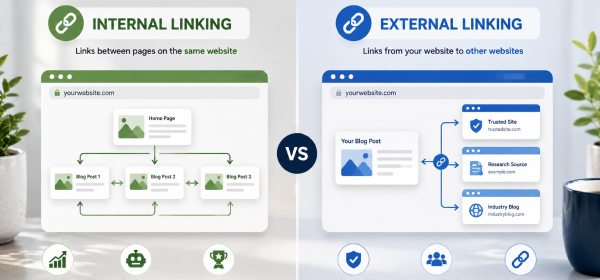
Although both types of links are valuable, they serve different purposes.
| Feature | Internal Links | External Links |
|---|---|---|
| Destination | Another page on the same website | A page on a different website |
| Purpose | Improve navigation and SEO | Provide additional references or resources |
| Control | Fully controlled by your website | Controlled by external websites |
| SEO Benefit | Distributes link equity and improves crawling | Builds credibility and provides context |
Both internal and external links should be part of a balanced SEO strategy.
Imagine you have a blog post about Keyword Research. Within that article, you naturally link to another guide titled How to Find Keywords for SEO.
This internal link helps readers continue learning while signaling to search engines that the two pages are closely related. Over time, a network of relevant internal links strengthens your website's topical authority.
Internal linking provides benefits that extend beyond simple website navigation. It supports search engine optimization, improves user engagement, and helps important pages gain more visibility.
Search engine crawlers follow links to find and index webpages. Internal links create clear pathways that allow crawlers to reach more pages on your website.
If a page has few or no internal links pointing to it, search engines may take longer to discover and index that content.
Visitors should be able to move easily between related pages without searching through menus. Internal links guide users toward additional resources that answer related questions or provide more detailed information.
This creates a smoother browsing experience and increases the likelihood that visitors will remain on your website.
Every webpage has a certain amount of authority. Internal linking helps distribute this authority across your website by passing value from stronger pages to newer or less visible pages.
Strategically linking to important content can improve its chances of performing well in search results.
Search engines evaluate how thoroughly a website covers a subject. Connecting related articles through internal links demonstrates that your content addresses a topic comprehensively.
For example, a pillar page about SEO can internally link to articles about keyword research, on-page SEO, technical SEO, and link building. This interconnected structure strengthens your site's topical relevance.
Internal links create connections between different pages, allowing both users and search engines to move through your website logically.
When search engine bots visit your website, they follow internal links to discover new content. A well-connected site makes crawling more efficient and reduces the likelihood of orphan pages.
The easier it is for search engines to crawl your website, the more effectively they can understand its structure.
Internal links show how different pages relate to one another. For example, an article about content marketing may naturally link to articles covering keyword research, SEO writing, and content optimization.
These relationships help search engines understand your website's topical structure.
Visitors often arrive on one page through search engines. Internal links encourage them to continue exploring related content, increasing engagement and improving the overall browsing experience.
A logical internal linking strategy keeps users moving through your website instead of leaving after reading a single page.
Not all internal links serve the same purpose. Understanding the different types helps you create a more organized website.
Navigational links appear in menus, headers, sidebars, and footers. They help users move between the main sections of your website.
These links are essential for usability because they provide quick access to important pages.
Contextual links are placed naturally within the body of your content. They connect readers to relevant articles that provide additional information on a related topic.
Because they appear within meaningful content, contextual links are often considered the most valuable type of internal link for SEO.
Breadcrumbs display the path a user has taken through your website.
Example:
Home → SEO → On-Page SEO → Internal Linking
Breadcrumbs improve navigation and help search engines understand your site's hierarchy.
Footer links provide access to important pages such as contact information, privacy policies, category pages, and cornerstone content.
Although useful, footer links should not replace contextual internal links within your content.
An effective internal linking strategy supports both SEO and user experience. Here are some of the biggest advantages.
Pages connected through internal links are easier for search engines to find and index, ensuring that valuable content has a better chance of appearing in search results.
Readers who find relevant internal links are more likely to visit additional pages, increasing page views per session.
Offering helpful related content encourages visitors to continue exploring instead of leaving after viewing a single page.
Internal links create meaningful relationships between articles, reinforcing topical relevance and helping search engines understand your expertise.
While internal links alone don't guarantee top rankings, they strengthen your website's structure and improve the visibility of important pages.
A successful internal linking strategy requires more than simply adding links throughout your website.
Anchor text should clearly describe the destination page so users and search engines understand what to expect.
Good Example:
Learn more in our On-Page SEO Checklist.
Poor Example:
Click here.
Descriptive anchor text improves accessibility and provides stronger contextual signals.
Only add internal links that genuinely help readers. Irrelevant links can distract users and weaken the overall quality of your content.
Focus on connecting pages that naturally support one another.
Your most valuable pages should receive more internal links than less important pages. This helps distribute authority and highlights cornerstone content within your website.
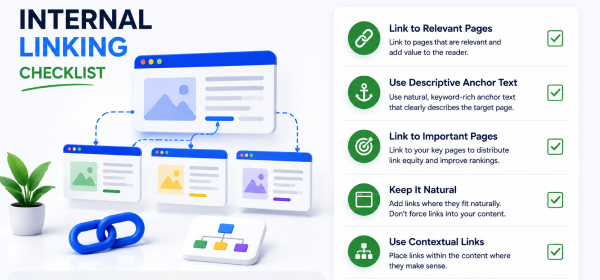
| Checklist Item | Status |
|---|---|
| Link to relevant pages | ✅ |
| Use descriptive anchor text | ✅ |
| Keep links natural | ✅ |
| Link to cornerstone content | ✅ |
| Avoid broken internal links | ✅ |
| Update old content with new links | ✅ |
| Maintain logical site hierarchy | ✅ |
| Check orphan pages regularly | ✅ |
Both internal and external links play an important role in SEO, but they serve different purposes. Understanding when to use each type helps you create a balanced linking strategy.
| Feature | Internal Linking | External Linking |
|---|---|---|
| Links Point To | Pages within your website | Pages on another website |
| Main Purpose | Improve navigation and SEO | Support content with trusted references |
| Website Control | Full control | No control over destination site |
| SEO Benefit | Passes link equity and improves crawling | Builds credibility and topical relevance |
| User Benefit | Helps visitors discover related content | Provides additional resources and evidence |
A successful SEO strategy uses both internal and external links naturally throughout the website.
Most internal links should remain DoFollow because they help search engines crawl your website and distribute link equity between pages.
| Link Type | Recommended for Internal Links? | Reason |
|---|---|---|
| DoFollow | ✅ Yes | Helps search engines crawl and understand your site structure. |
| NoFollow | ❌ Rarely | Prevents passing link equity and is generally unnecessary for internal links. |
In most situations, there is no need to add the nofollow attribute to internal links unless you have a specific technical reason.
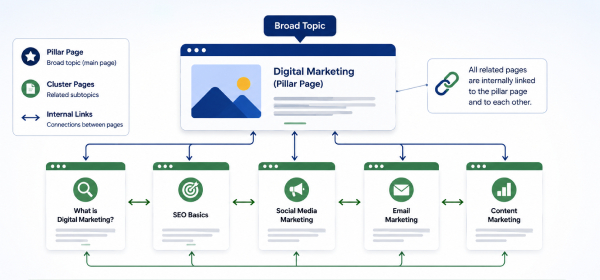
One of the most effective internal linking strategies is building pillar pages connected to topic clusters.
A pillar page covers a broad topic in depth, while cluster pages focus on specific subtopics. Every cluster page links back to the pillar page, and the pillar page links to each supporting article.
| Pillar Page | Supporting Articles |
|---|---|
| SEO Guide | What Is On-Page SEO? |
| SEO Guide | What Is Technical SEO? |
| SEO Guide | Keyword Research Guide |
| SEO Guide | Internal Linking Guide |
| SEO Guide | Link Building Guide |
This structure helps search engines understand the relationship between pages while strengthening topical authority.
Orphan pages are webpages that have no internal links pointing to them. Since search engine crawlers rely on links to discover content, orphan pages may not be crawled or indexed efficiently.
These pages also provide a poor user experience because visitors cannot easily find them while browsing your website.
Regularly audit your website to identify pages without incoming internal links. Add relevant contextual links from related articles, category pages, or pillar pages to ensure every important page is connected.
Keeping all valuable content linked improves crawlability and helps distribute authority more effectively.
There is no fixed number of internal links that every page should contain. The ideal number depends on the article's length, topic, and the amount of related content available.
A short article may only need a few relevant internal links, while a comprehensive guide can naturally include many more.
| Content Length | Suggested Internal Links |
|---|---|
| 800–1,000 words | 3–5 |
| 1,500 words | 5–8 |
| 2,500 words | 8–15 |
| 4,000+ words | 15–25 |
Focus on quality rather than quantity. Every link should provide additional value to the reader.
Placing excessive internal links on a single page can overwhelm readers and reduce the importance of the most valuable links.
Only include links that genuinely help users continue their learning journey.
Anchor text like "click here" or "read more" provides very little context. Instead, use descriptive anchor text that explains where the link leads.
Example:
✅ Learn more in our Keyword Research Guide.
❌ Click here.
Every internal link should support the topic being discussed. Linking to unrelated articles interrupts the reading experience and weakens your site's topical structure.
Many websites publish new articles without updating existing pages. Adding internal links from older content to newer articles helps search engines discover fresh content more quickly.
Important pages should never exist without internal links. Review your website regularly to ensure every valuable page is connected to the rest of your content.
Repeating identical anchor text for every internal link can make your content feel repetitive. Use natural variations while keeping the destination clear.
Internal linking is the practice of connecting one page of your website to another page on the same domain. It improves navigation, helps search engines crawl your content, and distributes authority across your website.
Internal linking helps search engines discover pages, understand content relationships, and prioritize important pages. It also improves user experience by guiding visitors to relevant information.
There is no fixed number. Add as many internal links as needed to help readers, provided each link is relevant and useful within the context of the page.
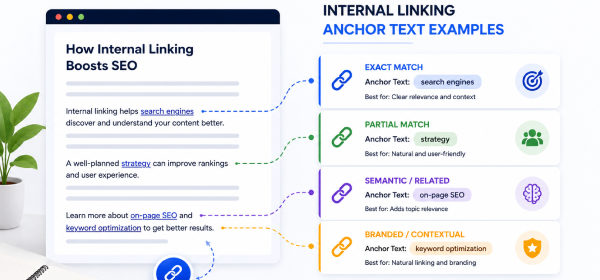
Anchor text is the clickable text used for a hyperlink. Descriptive anchor text helps users and search engines understand what the destination page is about.
Yes. While they are not the only ranking factor, internal links improve crawlability, distribute link equity, and strengthen topical relevance, all of which support better SEO performance.
Yes, but naturally. Use descriptive anchor text that accurately represents the linked page instead of forcing exact-match keywords into every link.
Orphan pages are pages with no internal links pointing to them. They are harder for users and search engines to discover and should be connected through relevant internal links.
Absolutely. Internal linking remains a core part of On-Page SEO because it improves website structure, user navigation, crawl efficiency, and topical authority.Internal Link Opportunities
Understanding What Is Internal Linking is essential for building a website that is easy to navigate and optimized for search engines. By connecting related pages, you help users discover more valuable content while enabling search engines to crawl and understand your website more efficiently.
An effective internal linking strategy goes beyond adding random hyperlinks. It involves using descriptive anchor text, linking relevant pages, strengthening pillar content, and maintaining a logical site structure. Regularly reviewing and updating your internal links also ensures that new and existing content continues to support your overall SEO goals.
When combined with high-quality content, strong keyword optimization, and a well-planned website architecture, internal linking becomes one of the most powerful techniques for improving rankings, increasing organic traffic, and enhancing user experience.