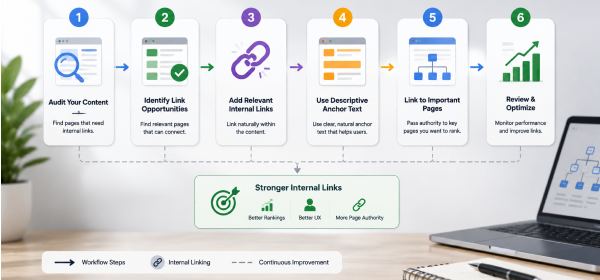
Internal Linking Best Practices involve linking related pages within your website using descriptive anchor text, maintaining a logical site structure, prioritizing important pages, and regularly updating internal links. A well-planned internal linking strategy improves crawlability, user experience, topical authority, and overall SEO performance.
Internal linking is one of the most effective yet often overlooked aspects of On-Page SEO. While many website owners focus on publishing new content or building backlinks, they frequently underestimate the impact of connecting their existing pages strategically. A strong internal linking structure helps search engines understand your website while guiding visitors toward the most valuable content.
Implementing Internal Linking Best Practices ensures that search engines can crawl your pages efficiently, distribute link equity across your website, and identify the relationships between related topics. At the same time, users benefit from a smoother browsing experience because they can easily discover additional resources that answer their questions.
Randomly placing links throughout your content isn't enough. Every internal link should have a purpose, whether it's supporting topical relevance, improving navigation, or strengthening cornerstone content. When done correctly, internal linking increases page views, reduces bounce rates, and contributes to long-term organic growth.
In this guide, you'll learn the most effective internal linking best practices, understand why they matter, and discover practical techniques you can apply to every page of your website.
Why Internal Linking Matters
Internal links do much more than connect webpages. They help search engines understand your site's structure, guide visitors to relevant content, and distribute authority throughout your website.
Without a clear internal linking strategy, even high-quality content can become difficult for users and search engines to discover.
Search engine bots rely on links to discover new pages. A strong internal linking structure creates clear pathways that allow crawlers to find, crawl, and index your content more efficiently.
Pages with few or no internal links often receive less visibility because search engines have difficulty reaching them.
Visitors should be able to move naturally from one related topic to another. Internal links make navigation easier by recommending additional resources that answer related questions.
This keeps users engaged and encourages them to spend more time exploring your website.
Internal links pass authority from stronger pages to other important pages within your website.
By linking strategically, you can strengthen newer articles, product pages, or cornerstone content without relying solely on external backlinks.
When multiple related pages are connected through contextual internal links, search engines gain a better understanding of your expertise in a subject area.
A well-connected content hub demonstrates comprehensive topic coverage, which supports better search visibility over time.
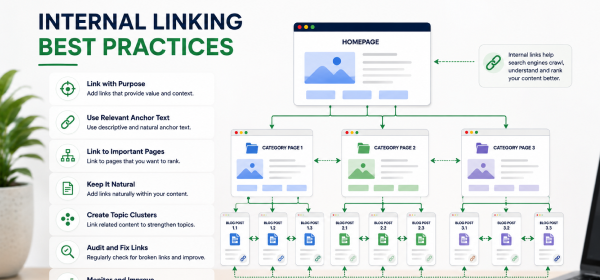
Applying the following best practices helps create a logical, SEO-friendly website structure.
Every internal link should provide additional value to the reader. Rather than linking randomly, connect pages that naturally expand on the topic being discussed.
For example, an article about keyword research can link to guides covering search intent, long-tail keywords, or keyword clustering. These connections improve the user journey while reinforcing topical relevance.
Anchor text should clearly describe the destination page instead of using generic phrases like "click here" or "learn more."
Descriptive anchor text helps users understand where the link leads and gives search engines additional context about the linked page.
Good Example
Poor Example
Contextual links placed naturally within the body of your content generally provide the greatest SEO value.
Because they appear within relevant paragraphs, these links strengthen topical relationships and encourage readers to continue exploring related articles.
Your most valuable pages should receive more internal links than less important pages.
These may include:
Increasing internal links to these pages helps search engines recognize their importance.
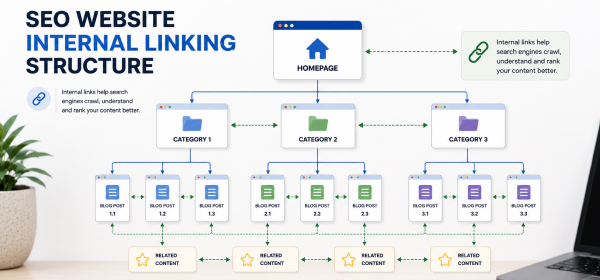
Your website should have a clear structure that allows users and search engines to navigate from broad topics to more specific ones.
A common hierarchy looks like this:
Home
↓
Category Page
↓
Pillar Page
↓
Supporting Articles
This structure improves crawlability and makes content easier to discover.
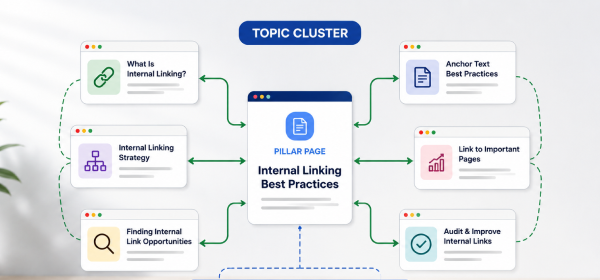
A successful internal linking strategy requires planning rather than adding links randomly.
Identify the most comprehensive pages on your website. These pillar pages should serve as central resources that link to supporting articles.
Likewise, every supporting article should link back to the relevant pillar page.
This creates a strong topic cluster that reinforces your authority on the subject.
Whenever you publish a new article, review older content to identify opportunities for adding relevant internal links.
Updating existing pages ensures that new content becomes part of your site's overall structure immediately.
Grouping related articles around a central topic improves both navigation and SEO.
Example:
| Pillar Topic | Supporting Content |
|---|---|
| SEO Guide | What Is SEO? |
| SEO Guide | On-Page SEO |
| SEO Guide | Technical SEO |
| SEO Guide | Keyword Research |
| SEO Guide | Internal Linking |
This approach strengthens topical authority while helping visitors discover additional content.
Important pages should be easy to reach from your homepage or primary navigation.
Generally, users should be able to access your key pages within three or four clicks.
A shallow site structure improves both usability and crawl efficiency.
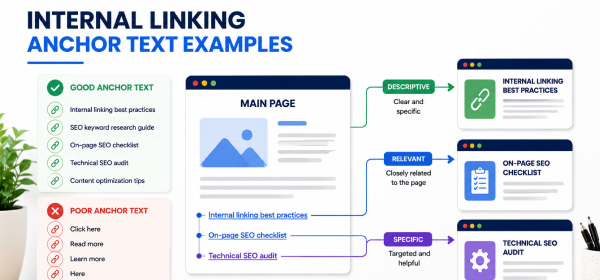
Anchor text plays a significant role in helping search engines understand linked pages.
Anchor text should fit naturally within the sentence.
Avoid forcing keywords simply to optimize links.
Instead, focus on creating descriptive phrases that improve readability.
Rather than repeating the same anchor text repeatedly, use natural variations.
Examples include:
This creates a more natural linking profile.
Using the exact same keyword in every anchor text can appear manipulative.
Mix exact-match, partial-match, branded, and descriptive anchors to create a balanced internal linking strategy.
| Checklist Item | Status |
|---|---|
| Link related pages together | ✅ |
| Use descriptive anchor text | ✅ |
| Prioritize contextual links | ✅ |
| Link to pillar pages | ✅ |
| Update old articles regularly | ✅ |
| Avoid orphan pages | ✅ |
| Maintain logical hierarchy | ✅ |
| Check broken internal links | ✅ |
| Keep navigation simple | ✅ |
| Review internal links during content updates | ✅ |
Not all internal links serve the same purpose. Understanding the different types helps you build a balanced internal linking strategy that benefits both users and search engines.
| Link Type | Where It Appears | Primary Purpose | SEO Value |
|---|---|---|---|
| Contextual Links | Within the main content | Connect related topics and improve user experience | ⭐⭐⭐⭐⭐ |
| Navigational Links | Header menus and sidebars | Help users access important sections | ⭐⭐⭐⭐☆ |
| Breadcrumb Links | Top of the page | Show page hierarchy and improve navigation | ⭐⭐⭐⭐☆ |
| Footer Links | Website footer | Link to essential pages like Contact, Privacy Policy, and categories | ⭐⭐⭐☆☆ |
While all link types are useful, contextual links generally provide the greatest SEO value because they connect related content naturally within the page.
Regular audits help ensure that your internal linking strategy remains effective as your website grows.
Begin by identifying your most valuable pages, such as pillar content, service pages, and high-performing blog posts. These pages should receive the highest number of relevant internal links.
Use SEO tools to identify pages that have no incoming internal links. Orphan pages are difficult for users and search engines to discover, so they should be linked from relevant content whenever possible.
Broken internal links create a poor user experience and waste crawl budget. Regularly scan your website and replace or remove links that point to deleted or moved pages.
Whenever you publish a new article, revisit older posts to add relevant internal links. This helps search engines discover fresh content faster and strengthens your site's topical structure.
There is no fixed rule for the number of internal links on a page. The right amount depends on the content length, complexity, and available related resources.
| Content Length | Recommended Internal Links |
|---|---|
| 800–1,000 words | 3–5 |
| 1,500 words | 5–8 |
| 2,500 words | 8–15 |
| 4,000+ words | 15–25 |
Rather than focusing on a specific number, ensure every internal link is relevant and genuinely helpful.
Different website types require different internal linking strategies.
| Blog Websites | eCommerce Websites |
|---|---|
| Link to related articles | Link to related products |
| Build topic clusters | Connect categories and subcategories |
| Strengthen pillar content | Link product pages to buying guides |
| Use contextual links frequently | Link products with accessories and alternatives |
| Update old articles regularly | Improve navigation with filters and collections |
Regardless of website type, the goal is to help users discover relevant content while improving website structure.
Adding links randomly creates an inconsistent website structure. Every internal link should support navigation, topical relevance, or page authority.
Using identical anchor text for every link can make your content feel repetitive. Instead, use natural variations that accurately describe the destination page.
Many websites repeatedly link only to their homepage or main categories while neglecting deeper content. Important articles several clicks away should also receive internal links.
Too many internal links can overwhelm readers and reduce the value of each link. Focus on quality over quantity.
Publishing new content without linking to it from older articles is a missed SEO opportunity. Make internal linking part of your publishing workflow.
As websites evolve, pages may be renamed or removed. Regularly checking for broken internal links helps maintain a smooth user experience and healthy site structure.
Internal Linking Best Practices include connecting related pages, using descriptive anchor text, maintaining a logical site hierarchy, prioritizing contextual links, and regularly auditing your website for broken or orphaned pages.
Internal links help search engines crawl and understand your website while distributing link equity between pages. They also improve user navigation and encourage visitors to explore additional content.
There is no exact number. A comprehensive 2,500-word guide can naturally include 8–15 relevant internal links, provided each one adds value to the reader.
The best anchor text clearly describes the destination page while fitting naturally within the surrounding sentence. Avoid generic text like "click here."
Yes. Linking to relevant older articles strengthens your website structure and helps readers discover more useful content.
Excessive internal links can reduce usability and dilute the importance of key links. Focus on adding only relevant, helpful links.
Perform a complete internal linking audit every three to six months or whenever you significantly update your website.
Yes. Internal links pass link equity between pages, helping search engines understand which pages are most important within your website.
Following Internal Linking Best Practices is one of the simplest ways to improve your website's SEO, user experience, and content discoverability. A thoughtful internal linking strategy helps search engines crawl your site efficiently, distributes authority to important pages, and builds stronger topical relevance across your content.
Instead of adding links randomly, focus on creating meaningful connections between related pages. Use descriptive anchor text, prioritize contextual links, strengthen pillar pages, and regularly audit your website for broken or orphaned links. As your content library grows, updating older articles with links to newer resources should become a routine part of your SEO workflow.
By consistently applying these best practices, you'll create a website that's easier to navigate, more authoritative in your niche, and better positioned to earn long-term organic traffic.