

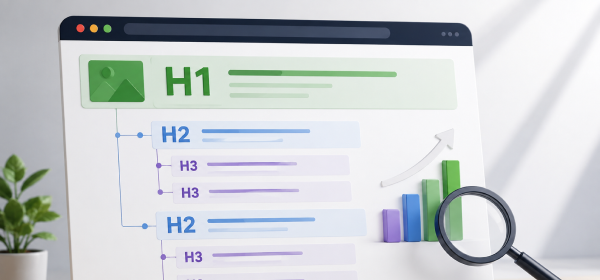
How to Optimize Headings (H1, H2, H3)? Use one descriptive H1 containing the primary keyword, organize major sections with H2 headings, and divide supporting topics with H3 headings. Keep headings clear, relevant, and aligned with search intent while avoiding keyword stuffing.
A well-written article is more than just great content. The way you organize that content plays a major role in both user experience and search engine optimization. One of the simplest yet most effective ways to improve your page is by using headings correctly.
Understanding How to Optimize Headings (H1, H2, H3) helps search engines understand your page structure while making it easier for visitors to scan and navigate your content. Proper heading optimization also improves readability, increases engagement, and supports better keyword relevance.
Many websites either overuse heading tags or use them incorrectly by adding multiple H1 tags or skipping heading levels. These mistakes make content less organized and can reduce its SEO effectiveness.
In this guide, you'll learn how to optimize H1, H2, and H3 headings using proven SEO practices, real examples, and actionable tips.
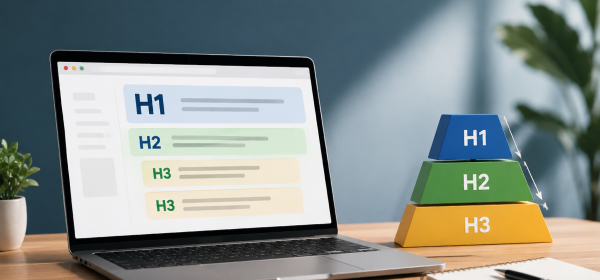
Heading tags are HTML elements that organize content into a logical hierarchy. They help search engines understand the relationship between different sections of a webpage while making the content easier for users to read.
Instead of presenting a long block of text, headings divide information into meaningful sections. This improves readability, helps users locate specific information quickly, and creates a better browsing experience.
HTML provides six heading levels, ranging from H1 to H6.
For most blog posts, using only H1, H2, and H3 is sufficient to create a clear and organized structure.
Headings are not just formatting elements—they provide context for both users and search engines. When used correctly, they improve content organization and help communicate the importance of each section.
Well-structured headings break large topics into manageable sections. Visitors can quickly scan the page and jump to the information they're looking for without reading every paragraph.
This structured layout increases readability and keeps users engaged for longer periods.
Search engines analyze headings to understand the primary topics covered on a page. Relevant headings reinforce the subject of your content and make it easier for search engines to determine which queries your page should rank for.
Although headings alone won't guarantee higher rankings, they strengthen the overall relevance of your content.
Most readers scan articles before deciding to read them in detail. Clear headings help users identify important sections immediately, making the page more user-friendly.
A positive reading experience often leads to longer session durations and lower bounce rates.
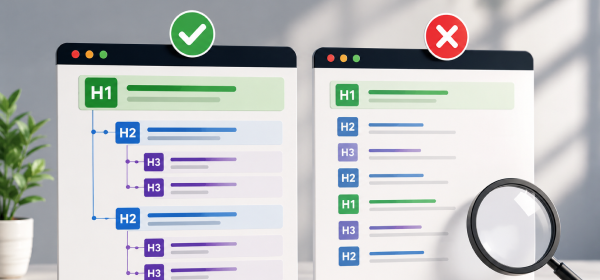
Each heading level serves a different purpose. Using them correctly creates a logical hierarchy that benefits both SEO and readability.
The H1 heading represents the primary topic of the page. Every webpage should have only one H1 because it tells search engines and users what the page is about.
Your H1 should include the primary keyword naturally while remaining clear and engaging. Avoid stuffing keywords or making the heading unnecessarily long.
Example:
✅ How to Optimize Headings (H1, H2, H3): 15 Powerful Tips for Better SEO
H2 headings divide your article into major sections. Each H2 should cover a unique aspect of the topic and naturally lead readers through the content.
For example, an article about heading optimization might include H2 sections covering H1 optimization, H2 optimization, common mistakes, and best practices.
Clear H2 headings improve navigation and make long articles easier to scan.
H3 headings are used to expand on points introduced under an H2 section. They help organize supporting information without overwhelming readers.
For example, under an H2 titled "How to Optimize H1 Headings," H3 headings might explain keyword placement, title length, and common errors.
Using H3 headings only when they add clarity keeps your article organized and easy to follow.
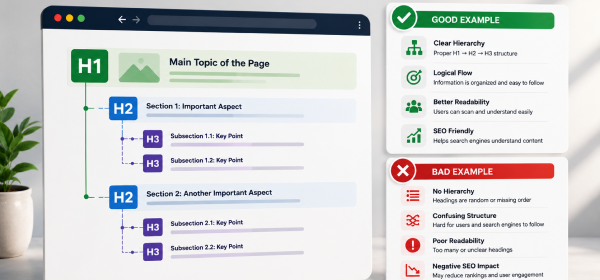
The H1 is one of the most important On-Page SEO elements because it defines the main topic of the page.
Place your focus keyword naturally within the H1. Ideally, the keyword should appear near the beginning of the heading to make the topic immediately clear.
Avoid forcing the keyword into the title multiple times. A single, natural occurrence is enough to establish relevance.
An effective H1 should attract readers while accurately describing the content. Focus on clarity rather than simply inserting keywords.
Titles that clearly communicate value are more likely to earn clicks and keep readers engaged.
Although there is no strict character limit for H1 headings, shorter titles are generally easier to read. Aim for a heading that communicates the topic without unnecessary words.
H2 headings organize your content into major sections, making long articles easier to navigate.
Each H2 should focus on a single topic. Avoid combining unrelated ideas within the same section, as this can confuse readers.
Organizing content into focused sections improves readability and helps search engines understand your page structure.
H2 headings provide an opportunity to include supporting keywords and semantic variations. This reinforces topical relevance without repeating the exact focus keyword excessively.
For example, instead of repeating the same phrase, use related terms such as "heading structure," "SEO headings," or "content organization."
Readers should immediately understand what information each section contains. Use descriptive wording rather than vague or overly creative headings.
A heading like "Benefits of Optimized Headings" is more useful than "Why This Matters."
H3 headings support the H2 section by breaking it into smaller, more detailed topics.
Use H3 headings when a section covers multiple ideas that deserve separate explanations. This keeps your content organized and prevents large walls of text.
Always place H3 headings under the appropriate H2 section. Skipping heading levels or using H3 headings without a parent H2 can create confusion for both users and search engines.
Readers should understand what each subsection covers simply by reading the heading. Clear wording improves navigation and makes your content easier to skim.
| Best Practice | Why It Matters |
|---|---|
| Use one H1 only | Defines the main topic |
| Organize with H2 sections | Improves readability |
| Use H3 for supporting topics | Creates logical hierarchy |
| Include keywords naturally | Reinforces relevance |
| Keep headings descriptive | Helps users scan content |
| Avoid keyword stuffing | Improves readability |
| Follow logical order | Makes content easier to understand |
| Multiple | Cover the major topics of the article. | ||
| H3 | Supporting subsections | As needed | Expand on ideas introduced under H2 headings. |
Think of your article like a book. The H1 is the book title, H2 headings are the chapter titles, and H3 headings are the subtopics within each chapter.
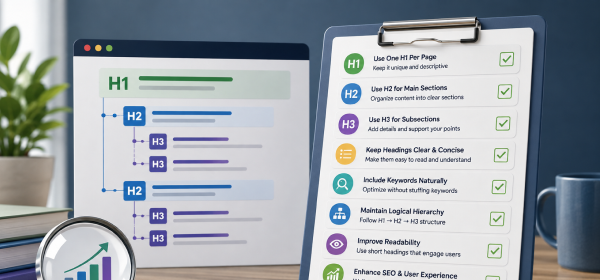
Before publishing any page, review the headings using the checklist below.
| Checklist Item | Status |
|---|---|
| Only one H1 used | ✅ |
| H1 includes the focus keyword | ✅ |
| H2 headings cover major sections | ✅ |
| H3 headings explain supporting topics | ✅ |
| Headings follow logical order | ✅ |
| No skipped heading levels | ✅ |
| Keywords used naturally | ✅ |
| Headings are descriptive | ✅ |
| No duplicate headings | ✅ |
| Easy to scan on desktop and mobile | ✅ |
Following a consistent checklist reduces formatting mistakes and helps maintain SEO quality across all your content.
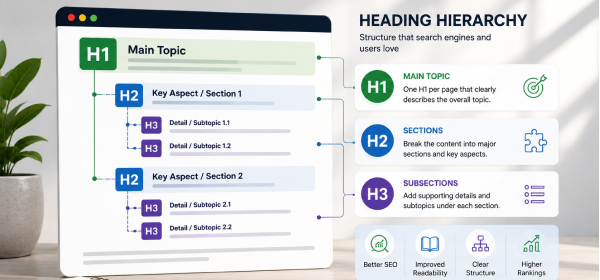
A webpage should normally have one primary H1 that clearly identifies the topic. Multiple H1 tags can make the page structure less clear and dilute the main focus of the content.
Generic headings such as "Introduction," "More Information," or "Things to Know" don't tell readers what they'll learn. Instead, write headings that clearly describe the section's content.
Adding the same keyword repeatedly makes headings look unnatural and can reduce readability. Use related keywords and write headings that sound natural.
Avoid jumping from an H1 directly to an H3 without an H2. Maintaining a logical hierarchy helps both readers and search engines understand your page.
Heading tags should organize content, not simply make text appear larger. Use CSS for visual styling and reserve heading tags for meaningful content structure.
The H1 is the main page title and should appear once. H2 headings divide the article into major sections, while H3 headings organize supporting information within those sections.
Yes. In most cases, using a single H1 clearly identifies the page's primary topic and creates a logical structure for both users and search engines.
Heading tags help search engines understand your content structure and improve readability for users. While they are not a standalone ranking factor, they support stronger On-Page SEO.
No. Include keywords naturally where they make sense. Overusing the same keyword can make headings repetitive and reduce readability.
It's best to avoid skipping heading levels. Use H2 headings before H3 headings to maintain a clear hierarchy and improve accessibility.
Headings should be concise but descriptive. Most effective headings are short enough to scan quickly while still explaining the section's purpose.
Yes. Question-based headings often align with search intent and can improve your chances of appearing in featured snippets and People Also Ask results.
For most blog posts, H1, H2, and H3 provide enough structure. Use H4 or lower levels only when a topic genuinely requires additional organization.
Learning How to Optimize Headings (H1, H2, H3) is one of the easiest ways to improve your On-Page SEO and create a better reading experience. A clear heading structure helps search engines understand your content while allowing visitors to navigate long articles more easily.
Use one H1 to define the main topic, organize key sections with H2 headings, and add H3 headings only when they improve clarity. Keep your headings descriptive, align them with search intent, and avoid keyword stuffing or unnecessary complexity.
By consistently following these best practices, you'll build content that's easier to read, easier to crawl, and better positioned to perform well in search results.