
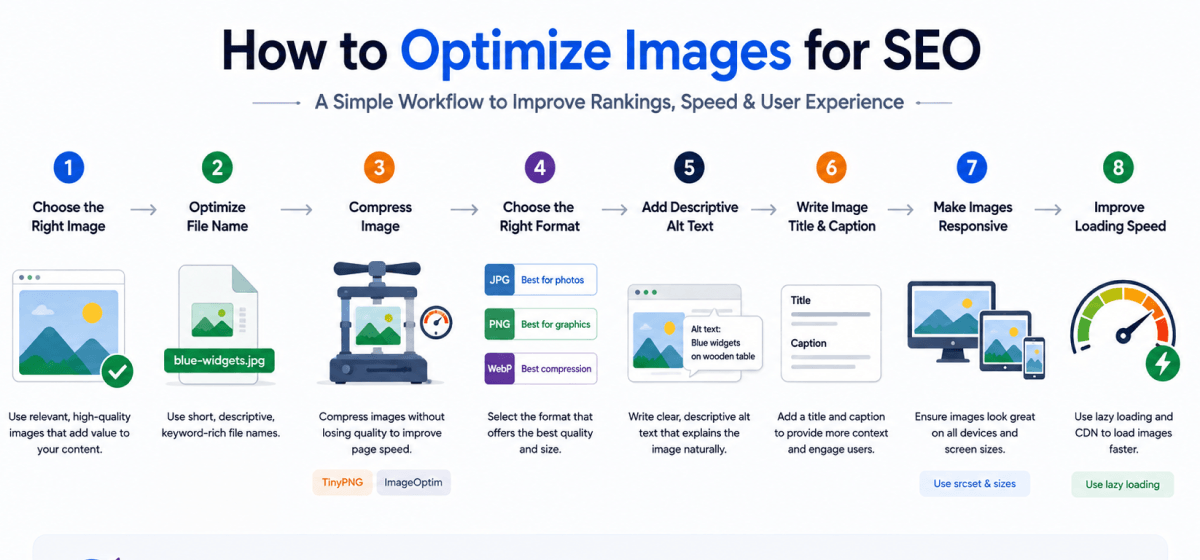
How to Optimize Images for SEO? Optimize images by using descriptive file names, writing keyword-rich ALT text, compressing images without losing quality, choosing modern formats like WebP, enabling lazy loading, and using responsive images. These practices improve page speed, accessibility, user experience, and search engine rankings.
Images make your content more engaging, easier to understand, and visually appealing. However, simply uploading high-quality images isn't enough if you want to achieve strong search engine rankings. Learning How to Optimize Images for SEO ensures your visuals contribute to your website's performance instead of slowing it down.
Proper image optimization helps search engines understand your content while improving page speed, accessibility, and user experience. Optimized images can also appear in Google Images, generating additional organic traffic and increasing the visibility of your website.
Many website owners overlook important image SEO elements such as descriptive filenames, ALT text, image compression, and responsive design. As a result, their pages load slowly and miss valuable ranking opportunities.
This guide explains How to Optimize Images for SEO using proven best practices that improve crawlability, loading speed, accessibility, and overall On-Page SEO. Whether you run a blog, business website, or eCommerce store, these strategies will help your images support your overall SEO goals.
Optimizing images is about much more than improving appearance. Image SEO helps search engines understand visual content while improving website performance and accessibility.
A properly optimized image can contribute to better rankings, faster page loading, and higher user engagement.
Large image files are one of the most common reasons websites load slowly. Compressing images and using modern file formats reduces page size without significantly affecting visual quality.
Faster websites provide a better user experience and support stronger SEO performance because page speed is an important ranking signal.
Google Image Search is another source of organic traffic. By following How to Optimize Images for SEO, you increase the chances of your images appearing in relevant image search results.
Optimized images with descriptive filenames, ALT text, and surrounding contextual content are easier for search engines to understand and index.
Search engines and screen readers rely on ALT text to understand image content.
Descriptive ALT text makes your website more accessible to users with visual impairments while providing additional context for search engines.
Well-optimized images load quickly, display correctly on different devices, and support the content instead of distracting from it.
A faster, more visually appealing page encourages visitors to stay longer and engage with your content.
Unlike humans, search engines cannot fully interpret the visual details of an image. Instead, they rely on surrounding information to determine what the image represents.
Understanding this process is essential when learning How to Optimize Images for SEO.
Search engines examine image filenames before processing the image.
Good Example
how-to-optimize-images-for-seo.webp
Poor Example
IMG_45892.jpg
A descriptive filename immediately provides context and supports image SEO.
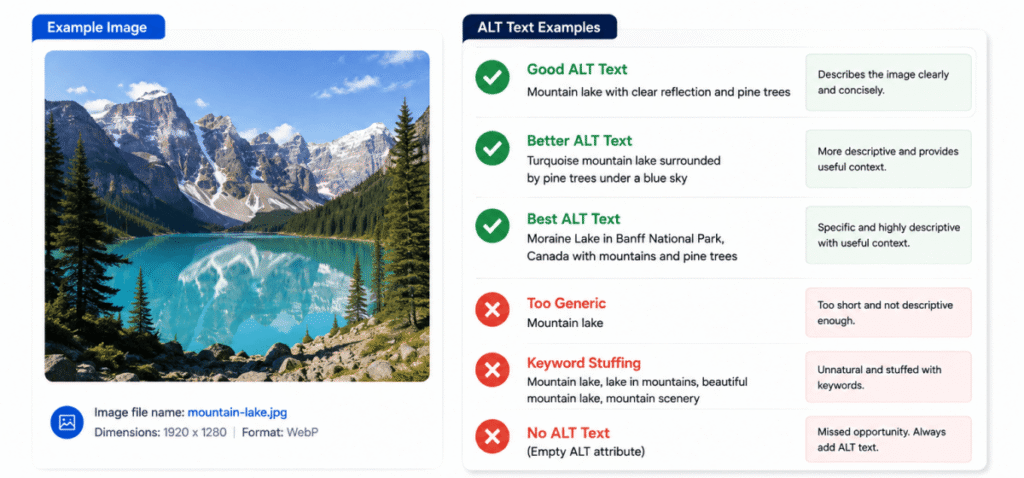
ALT text describes the content of an image for accessibility and search engines.
A good ALT attribute explains what appears in the image while naturally incorporating the focus keyword when appropriate.
Example
"Infographic explaining How to Optimize Images for SEO using WebP images and descriptive ALT text."
Search engines also evaluate the text surrounding an image.
If your article discusses image optimization and the nearby paragraphs explain image compression, descriptive filenames, and ALT text, Google gains additional context about the image.
Schema markup can provide extra information about images, especially for products, recipes, articles, and other rich results.
Although not required for every website, structured data enhances the way search engines interpret your content.
Following a consistent optimization process helps every image contribute to better rankings and a faster website.
Rename every image before uploading it.
Instead of generic filenames generated by a camera or design tool, use descriptive names that explain the image.
Good Example
seo-image-optimization-checklist.webp
Poor Example
photo12345.jpg
Descriptive filenames help search engines understand image relevance before analyzing other page elements.
Selecting the correct file format balances image quality and loading speed.
| Format | Best Use | SEO Benefit |
|---|---|---|
| WebP | Most websites | Excellent compression and quality |
| JPEG | Photographs | Small file sizes |
| PNG | Graphics with transparency | High image quality |
| SVG | Logos and icons | Scales without quality loss |
| AVIF | Modern websites | Superior compression and performance |
Whenever possible, use WebP or AVIF because they provide excellent quality with smaller file sizes.
Image compression removes unnecessary data without noticeably reducing visual quality.
Smaller image files improve page speed, reduce bandwidth usage, and create a better user experience.
Always compress images before publishing them rather than relying solely on your CMS or CDN.
Responsive images automatically adjust to different screen sizes.
Instead of forcing mobile users to download large desktop images, responsive images deliver appropriately sized files for each device.
This improves loading speed across desktops, tablets, and smartphones.
ALT text is one of the most important components of image SEO.
Write ALT text that accurately describes what appears in the image.
The description should be concise, informative, and helpful for users who rely on screen readers.
When the image genuinely relates to the topic, include the focus keyword naturally.
Example:
"Diagram showing How to Optimize Images for SEO using descriptive filenames and WebP images."
Avoid forcing the keyword into every ALT attribute.
ALT text should describe the image not repeat keywords.
Good Example
"Screenshot showing image compression settings for SEO."
Poor Example
"How to Optimize Images for SEO, Image SEO, SEO images, optimize images, image optimization."
Over-optimized ALT text provides a poor user experience and offers little additional SEO value.
Lazy loading delays the loading of images until they are about to appear on the user's screen.
This significantly reduces initial page load time and improves Core Web Vitals, especially on pages containing many images.
Original images help your content stand out and can improve credibility. Whenever possible, create custom graphics, screenshots, or illustrations instead of relying exclusively on stock images.
Unique visuals also improve engagement and make your content more memorable.
Upload images at the dimensions needed for your website instead of uploading very large files and relying on CSS to resize them.
Serving properly sized images reduces file size and improves performance.
| Checklist Item | Status |
|---|---|
| Use descriptive filenames | ✅ |
| Compress every image | ✅ |
| Choose WebP or AVIF where possible | ✅ |
| Write descriptive ALT text | ✅ |
| Include focus keyword naturally in relevant ALT text | ✅ |
| Use responsive images | ✅ |
| Enable lazy loading | ✅ |
| Optimize image dimensions | ✅ |
| Place images near relevant content | ✅ |
| Test page speed after uploading images | ✅ |
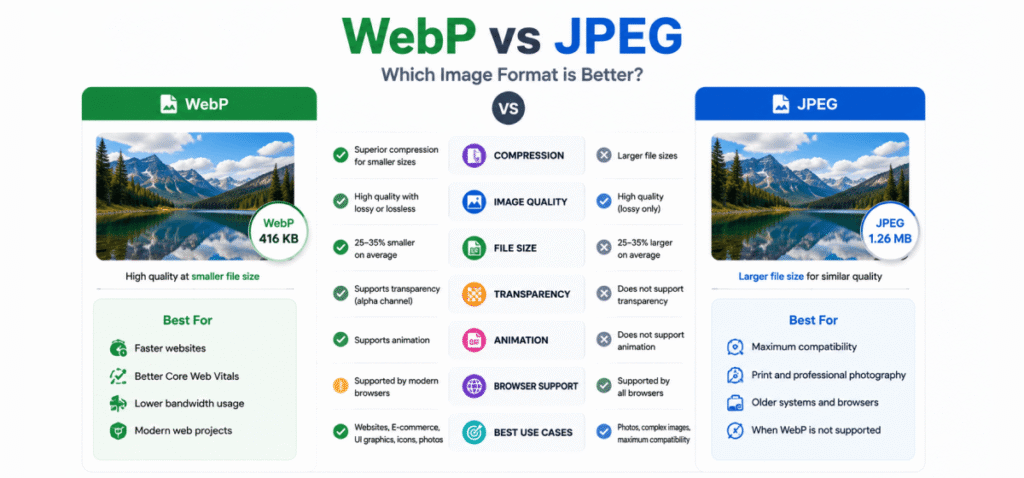
Choosing the right image format is one of the most important parts of How to Optimize Images for SEO. Each format has different strengths depending on the type of image you're using.
| Image Format | Best For | Compression | Image Quality | SEO Performance |
|---|---|---|---|---|
| WebP | Blogs, websites, featured images | Excellent | High | ⭐⭐⭐⭐⭐ |
| AVIF | Modern websites | Outstanding | Excellent | ⭐⭐⭐⭐⭐ |
| JPEG | Photographs | Good | High | ⭐⭐⭐⭐☆ |
| PNG | Graphics, logos, transparency | Moderate | Excellent | ⭐⭐⭐☆☆ |
| SVG | Icons, logos, illustrations | Vector-based | Infinite scaling | ⭐⭐⭐⭐⭐ |
For most websites, WebP offers the best balance between image quality and loading speed. If your hosting environment supports AVIF, it can provide even better compression.
You don't need expensive software to improve image SEO. Many free and paid tools can compress images, convert file formats, and optimize performance.
| Tool | Best For | Free Version |
|---|---|---|
| TinyPNG | Image compression | ✅ |
| Squoosh | Compression and format conversion | ✅ |
| ImageOptim | macOS image optimization | ✅ |
| ShortPixel | WordPress image optimization | ✅ |
| Imagify | Automatic image optimization | ✅ |
| Adobe Photoshop | Professional editing and exporting | ❌ |
| Canva | Basic image editing and resizing | ✅ |
Using these tools before uploading images helps reduce file size while maintaining visual quality.
If your website contains many important images, creating an image sitemap can help search engines discover and index them more efficiently.
An image sitemap is especially useful for:
For most blogs, image sitemaps are automatically generated by SEO plugins or your CMS, making implementation simple.
Different types of websites require different image optimization strategies.
| Blog Websites | eCommerce Websites |
|---|---|
| Use descriptive featured images | Optimize every product image |
| Add informative ALT text | Include product names in ALT text where appropriate |
| Compress article images | Compress product galleries |
| Use screenshots and custom graphics | Add multiple product angles |
| Include images near relevant content | Optimize category and collection images |
Regardless of your website type, every image should load quickly, be relevant to the page, and include descriptive metadata.
Large images increase page load times and negatively affect Core Web Vitals. Always resize and compress images before uploading them.
File names such as IMG12345.jpg provide no context to search engines. Rename every image using descriptive keywords before uploading.
Missing ALT text reduces accessibility and makes it harder for search engines to understand image content.
While keywords are useful, stuffing the same phrase into every ALT tag creates a poor user experience. Write natural descriptions instead.
Using PNG for every image often results in unnecessarily large file sizes. Select the format that best matches the image type.
Images should display correctly on smartphones and tablets. Responsive images ensure fast loading across all devices.
Without lazy loading, browsers attempt to download every image immediately, slowing the initial page load especially on long articles.
How to Optimize Images for SEO involves compressing images, choosing modern file formats, writing descriptive ALT text, using keyword-friendly file names, enabling lazy loading, and serving responsive images to improve rankings and page speed.
WebP is the preferred format for most websites because it offers excellent compression without sacrificing image quality. AVIF provides even better compression if your platform supports it.
Yes. ALT text helps search engines understand image content and improves accessibility for users who rely on screen readers. It should accurately describe the image and include the focus keyword only when it fits naturally.
In most cases, yes. Informative images should always include descriptive ALT text. Decorative images may use an empty ALT attribute if they provide no informational value.
Modern compression tools significantly reduce file size while maintaining excellent visual quality. Choosing the correct compression level balances performance and appearance.
Resize images to match the maximum display size on your website. Uploading oversized images wastes bandwidth and slows page loading.
Yes. Properly optimized images can rank in Google Images, improve page speed, enhance user experience, and contribute to stronger organic search performance.
Review image optimization every few months or whenever you update existing content. Replace oversized files, improve ALT text, and convert older images to modern formats when appropriate.
Learning How to Optimize Images for SEO is an essential part of building a fast, accessible, and search-friendly website. Optimized images not only improve page speed but also help search engines better understand your content, increasing the likelihood of ranking in both web search and Google Images.
A successful image SEO strategy includes choosing the right file format, compressing images, writing descriptive ALT text, using meaningful file names, enabling lazy loading, and serving responsive images. These practices work together to improve user experience, Core Web Vitals, and overall search visibility.
As you publish new content, make image optimization a standard part of your workflow rather than an afterthought. Consistently applying these techniques will strengthen your On-Page SEO, support long-term organic growth, and ensure every image contributes to your website's success.