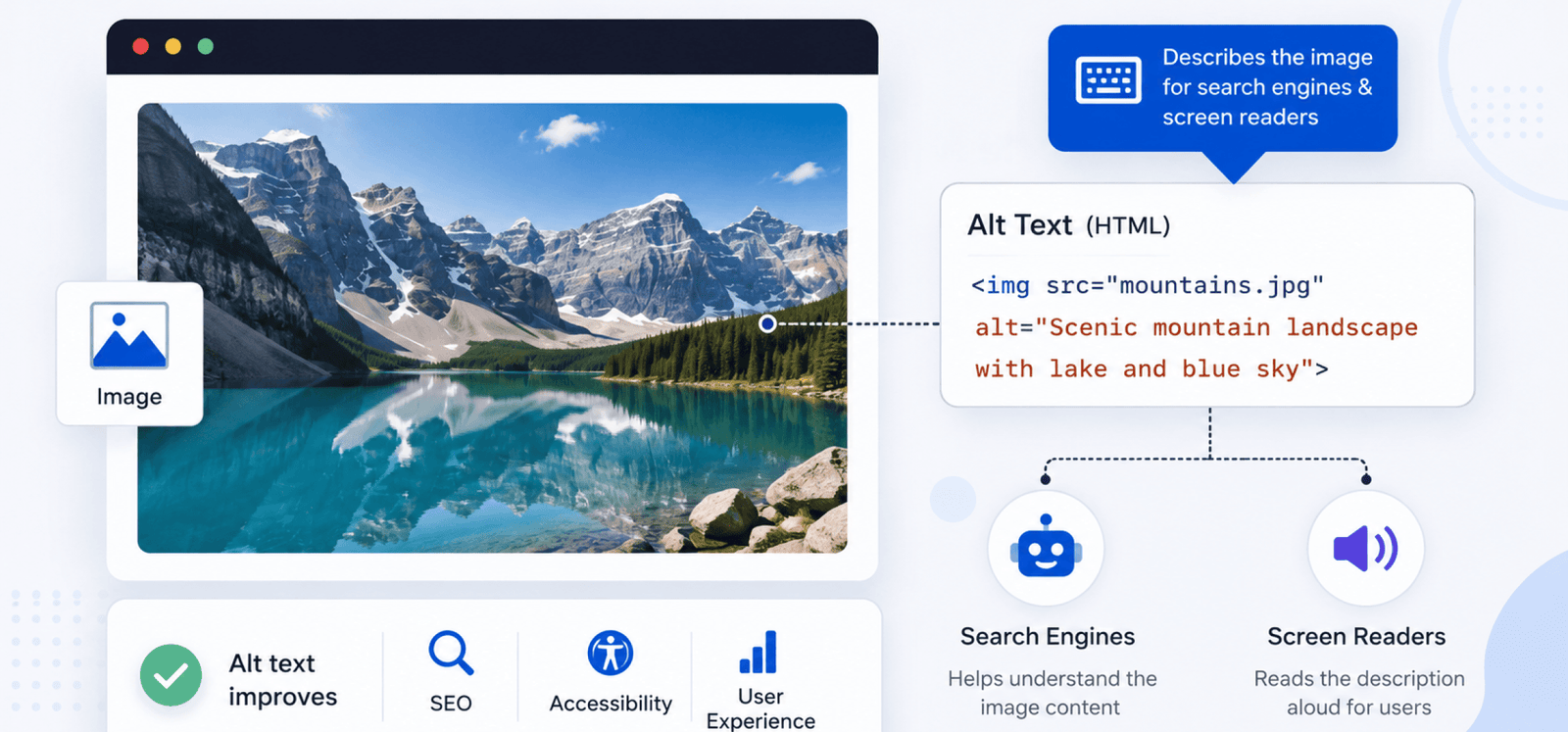
What Is Image Alt Text? Image ALT text (alternative text) is a written description added to an image's HTML code using the alt attribute. It helps search engines understand image content and allows screen readers to describe images to visually impaired users. Well-written ALT text improves accessibility and supports image SEO.
Images make web pages more engaging, but search engines cannot interpret visual content the same way humans can. This is where understanding What Is Image Alt Text becomes important. ALT text provides a textual description of an image, helping search engines understand its content while improving accessibility for users who rely on screen readers.
Adding descriptive ALT text is one of the simplest yet most effective image SEO techniques. It helps Google better understand the purpose of an image, increases the chances of appearing in Google Images, and improves the overall quality of your web pages. When images fail to load, ALT text also serves as a replacement description so users still understand what should appear.
Many website owners either ignore ALT text or misuse it by stuffing keywords into every image. A better approach is to write concise, accurate descriptions that naturally support the page's topic. Learning What Is Image Alt Text and applying the correct techniques will strengthen both your SEO strategy and your website's accessibility.
In this guide, you'll learn what image ALT text is, why it matters, how search engines use it, and the best practices for writing ALT text that benefits both users and search engines.
Image ALT text, also known as alternative text or the ALT attribute, is a short description added to an image in HTML. Its primary purpose is to describe the image for users who cannot see it and to provide context to search engines.
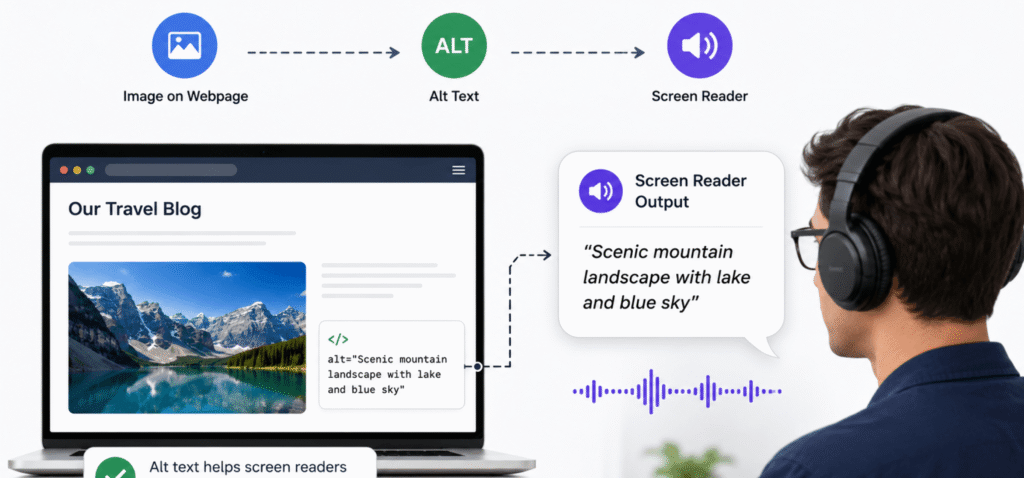
When someone uses a screen reader, the ALT text is read aloud, allowing them to understand the image's purpose. If an image fails to load because of a slow connection or technical issue, the ALT text is displayed instead.
Understanding What Is Image Alt Text is essential because it improves accessibility while giving search engines additional information about your page's content.
Many beginners confuse ALT text with the image title, but they serve different purposes.
| Feature | Image ALT Text | Image Title |
|---|---|---|
| Primary Purpose | Describe the image | Provide additional information on hover |
| Used by Screen Readers | ✅ Yes | ❌ No |
| Supports Accessibility | ✅ Yes | ❌ Limited |
| Helps Image SEO | ✅ Yes | ⭐ Limited |
| Appears if Image Doesn't Load | ✅ Yes | ❌ No |
While the image title can enhance user experience in some situations, ALT text is far more important for accessibility and SEO.
Consider an image showing a person optimizing images in a content management system.
Good ALT Text
"Marketer optimizing website images for better SEO performance."
Poor ALT Text
"image1.jpg"
Keyword Stuffing Example
"What Is Image Alt Text, image alt text, image SEO, SEO image optimization, best alt text."
The first example accurately describes the image, while the second provides no useful information and the third overuses keywords.
Adding ALT text is not just an SEO recommendation it's also an accessibility best practice.
People using screen readers rely on ALT text to understand visual content. Without it, they may miss important information contained in charts, screenshots, diagrams, or product images.
Descriptive ALT text makes your website more inclusive and aligns with modern web accessibility standards.
Search engines cannot fully interpret image content on their own. ALT text provides valuable context that helps Google determine what an image represents.
Following What Is Image Alt Text best practices makes it easier for search engines to associate images with relevant search queries.
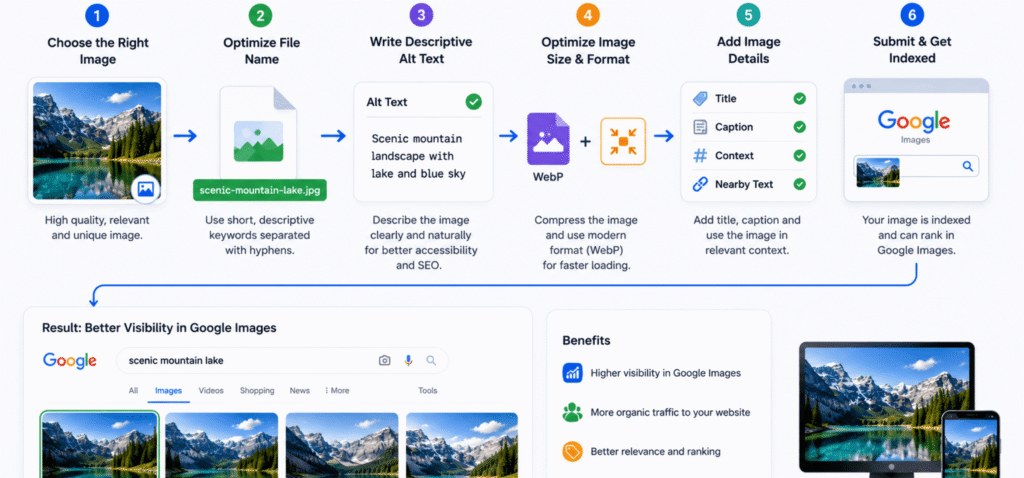
Well-optimized images are more likely to appear in Google Images.
This creates another opportunity to attract organic visitors who may not discover your website through traditional search results.
If an image cannot load because of network issues or browser problems, ALT text appears instead of the missing image.
Users can still understand what the image was intended to show, preventing confusion.
Search engines evaluate multiple signals to understand image content, and ALT text is one of the most important.
Google considers the text surrounding an image, including headings, captions, and nearby paragraphs.
When ALT text aligns with the surrounding content, search engines gain a clearer understanding of the page's topic.
Search engines also evaluate descriptive filenames.
Good Example
what-is-image-alt-text-example.webp
Poor Example
IMG_8456.jpg
A descriptive filename complements the ALT text and strengthens image relevance.
Structured data can provide additional context for images, particularly on product pages, recipes, articles, and other rich results.
Although schema markup doesn't replace ALT text, the two work well together.
Google analyzes the overall topic of the webpage before evaluating image relevance.
For example, an article about image SEO should contain ALT text that naturally supports the surrounding content rather than unrelated descriptions.
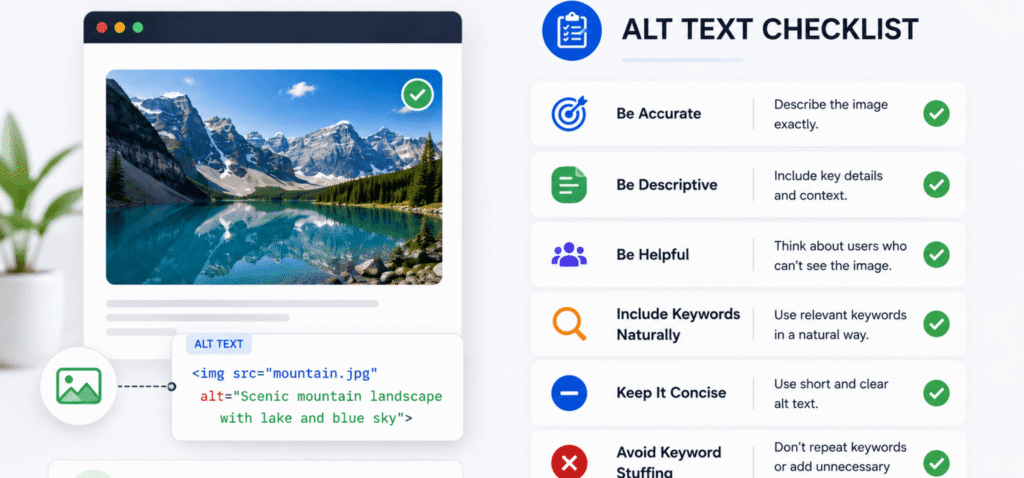
Writing effective ALT text is about balancing clarity, accessibility, and SEO.
Your first priority should always be describing what actually appears in the image.
Readers using screen readers should receive enough information to understand the image without seeing it.
Most effective ALT text is one short sentence.
Avoid unnecessary details that do not help users understand the image.
If the image directly relates to the article topic, you can naturally include the focus keyword.
Example:
"Infographic explaining What Is Image Alt Text and why it improves image SEO."
Avoid forcing the keyword into every ALT attribute.
Every image should have its own description.
Using identical ALT text for multiple images reduces usefulness and provides little additional context for search engines.
For clickable images such as buttons or icons, describe their function rather than their visual appearance.
For example:
"Download SEO checklist."
This provides more value than describing the button's color or shape.
Screen readers already announce that an element is an image.
Instead of writing:
"Image of a laptop showing SEO analytics."
Write:
"Laptop displaying SEO analytics dashboard."
This makes ALT text shorter and more natural.
Purely decorative images that add no informational value can use an empty ALT attribute (alt="").
This prevents screen readers from announcing unnecessary content while keeping the browsing experience cleaner.
| Checklist Item | Status |
|---|---|
| Describe the image accurately | ✅ |
| Keep ALT text concise | ✅ |
| Include the focus keyword naturally | ✅ |
| Write unique ALT text for every image | ✅ |
| Use descriptive image filenames | ✅ |
| Match ALT text with page context | ✅ |
| Skip "image of" and "picture of" | ✅ |
| Leave decorative images empty | ✅ |
| Improve accessibility | ✅ |
| Review ALT text during SEO audits | ✅ |
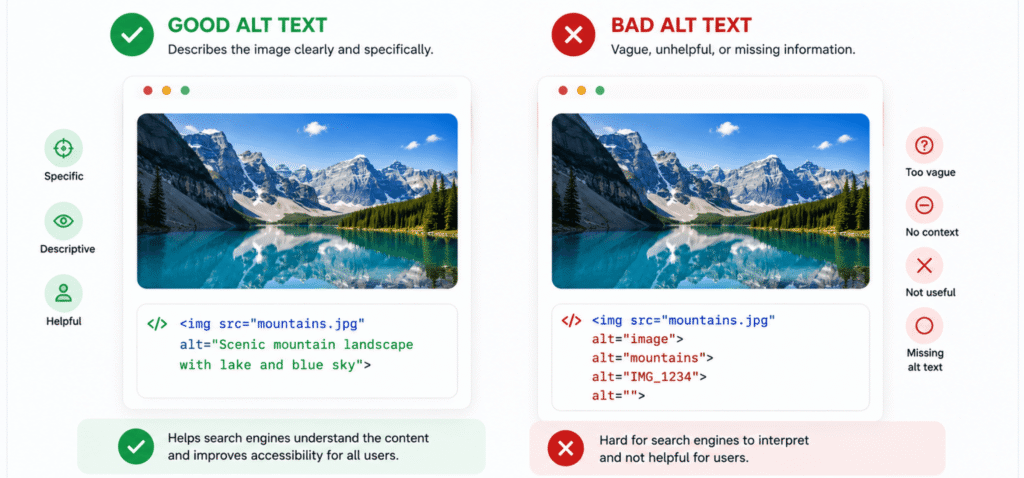
One of the easiest ways to understand What Is Image Alt Text is by comparing effective and ineffective examples. Good ALT text clearly describes the image, while poor ALT text is vague, repetitive, or stuffed with keywords.
| Image | Good ALT Text | Poor ALT Text |
|---|---|---|
| SEO dashboard | SEO dashboard showing organic traffic growth | image1.jpg |
| Product image | Black wireless headphones on a wooden desk | headphones, headphones, buy headphones |
| Blog infographic | Infographic explaining What Is Image Alt Text for SEO | infographic |
| Laptop screen | Content editor writing SEO-friendly ALT text | laptop image |
| Google Images screenshot | Google Images search results for image SEO | screenshot123.png |
Always write ALT text that helps users understand the image rather than trying to manipulate search engines.
Different types of websites require different approaches when writing ALT text.
| Blog Websites | eCommerce Websites |
|---|---|
| Describe screenshots and infographics | Describe the product accurately |
| Explain diagrams and charts | Mention product color or model when relevant |
| Include the focus keyword naturally | Include product name naturally |
| Focus on educational value | Focus on product identification |
| Keep descriptions concise | Mention important distinguishing features |
Although the writing style changes, the goal remains the same: provide an accurate description that improves accessibility and helps search engines understand the image.
Not every image requires detailed ALT text. Knowing the difference between decorative and informative images helps you apply ALT attributes correctly.
Informative images add value to the page by explaining a concept or supporting the content. These images should always include descriptive ALT text.
Examples include:
Decorative images are used only for visual design and do not add meaningful information.
Examples include:
For these images, use an empty ALT attribute (alt="") so screen readers skip them.
One of the most common mistakes is repeating keywords unnaturally.
Poor Example
"What Is Image Alt Text, image SEO, image optimization, SEO images, best image SEO."
Instead, write a natural description that accurately explains the image.
Descriptions such as "image", "photo", or "picture" provide little value.
Always describe what actually appears in the image.
Important images should never be published without ALT text. Missing descriptions reduce accessibility and limit search engines' understanding of your content.
ALT text should be concise. Long paragraphs are difficult for screen reader users and unnecessary for search engines.
Every image serves a different purpose. Writing unique ALT text for each image provides better context and avoids duplicate descriptions.
ALT text should complement the content around the image. A mismatch between the image description and the page topic can reduce relevance.
What Is Image Alt Text? It is a written description added to an image using the HTML alt attribute. It helps screen readers describe images to visually impaired users and helps search engines understand image content for better SEO.
Image ALT text improves website accessibility, provides context when images fail to load, and helps search engines index images more accurately. It is a key component of image SEO.
Informative images should always include descriptive ALT text. Decorative images that do not provide meaningful information can use an empty ALT attribute (alt="").
Keep ALT text concise while providing enough detail to describe the image accurately. One short sentence is usually sufficient.
ALT text alone is not a direct ranking factor, but it supports image SEO, improves accessibility, and helps images appear in Google Images, contributing to better overall search visibility.
Yes, but only when they fit naturally within the description. The priority should always be accurately describing the image rather than forcing keywords.
ALT text is used for accessibility and SEO, while the image title mainly provides additional information when users hover over an image. ALT text is significantly more important.
Review ALT text whenever you update content or perform an SEO audit. Improving older image descriptions can strengthen accessibility and image search performance.
Understanding What Is Image Alt Text is essential for creating accessible, search-friendly websites. Well-written ALT text helps users who rely on screen readers, provides context when images cannot be displayed, and gives search engines valuable information about visual content.
The best ALT text is clear, concise, and descriptive. Instead of stuffing keywords or writing generic labels, focus on accurately explaining the image while naturally supporting the page's topic. Combined with descriptive file names, optimized image formats, and fast-loading pages, effective ALT text strengthens your overall image SEO strategy.
Make reviewing ALT text a regular part of your content publishing and SEO audit process. Consistently following these best practices will improve accessibility, enhance user experience, and increase your opportunities to rank in Google Images and traditional search results.